Concepts
The whole model, in one paragraph
A region volume is a shape with a gameplay tag. Anything the volume is set to track that enters it is in that region, and in every region above it in the tag hierarchy. You ask three questions and get one honest answer to each: is this actor in that region, which single region is it in, and who is in that region. Two words appear in every query name and mean the same thing everywhere. Exact means a volume authored that tag. Or Nested means the hierarchy counts too. When several regions claim an actor at once, one documented rule picks the winner, and it picks the same winner on every machine.
Regions are your tags, not ours
VT Atlas ships no region vocabulary and imposes no depth. You name your own regions in the project's gameplay tag table, and the hierarchy you write is the hierarchy the plugin uses.
Castle
Castle.Keep
Castle.Keep.Hall
Castle.Keep.Hall.Vault
Place a volume tagged Castle.Keep.Hall.Vault and an actor standing in it is in the vault, in the
hall, in the keep and in the castle. You did not have to place four volumes, and nothing had to be
told that a vault sits inside a hall. The tag said so.

Seen from above, that is one boundary inside another:
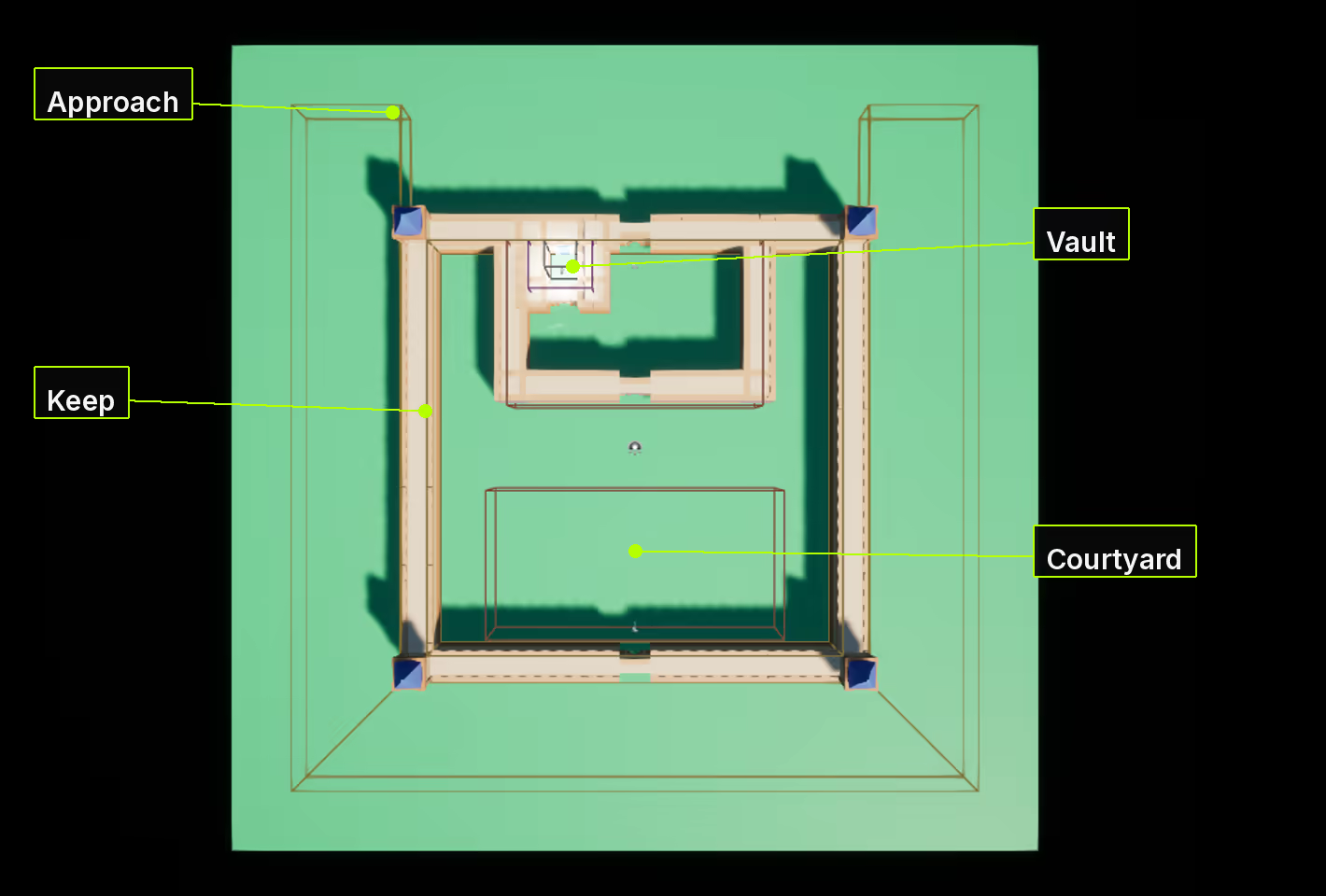
That is the whole reason regions are tags. A depth limit, a fixed vocabulary or a "zone parent" field would all be a second place to say the same thing, and a second place to get it wrong.
Exact and Or Nested
Every query comes in two forms and they answer different questions.
Exact asks about volumes that literally carry the tag. Is Actor In Region Exact(Castle.Keep) is
true only while the actor is inside a volume tagged Castle.Keep.
Or Nested asks about the region and everything under it. Is Actor In Region Or Nested(Castle.Keep)
is true while the actor is in the keep, the hall or the vault.
Most of the time you want Or Nested: "is the player in the castle" is a question about the castle and everything in it. Exact is for when the volume itself matters, which is rarer than it sounds.
The same two words appear on the events. Entering a volume tagged Castle.Keep.Hall.Vault fires the
exact event once, for that tag, and the nested event four times, once for the vault and once for each
region above it. That is not a bug and it is worth understanding before you count callbacks: the
nested event means "you are somewhere you were not before", and you were not in any of those four.
Neither one implies the other. A player who reaches the hall through a doorway that pokes outside the keep, and then walks into the keep proper, crosses the exact edge for the keep and crosses no nested edge at all, because they never stopped being in the keep. If you only listen to one edge you will miss real crossings. This is why both exist.
Which single region am I in
Regions overlap, so "which region is the player in" needs a rule. VT Atlas resolves one region and it resolves the same one everywhere, from the volumes the actor is actually inside:
- Higher Priority wins. This is the dial you set when you want a specific answer.
- Then the deeper region wins. The vault beats the hall beats the keep.
- Then the tag that sorts first, by name.
- Then the volume that registered first.
Rules 3 and 4 exist so the answer is never arbitrary. You should not need them, and if you find yourself relying on one, set a Priority instead and say what you meant.
The Region Listener component reports this answer, with a display name attached, and tells you when it changes. That is the two-node path to a location banner.
Two ways to hear about crossings
The Region Occupant interface is the light path. Implement it on an actor and the actor is told about its own crossings, with nothing to subscribe to and nothing to unsubscribe. It hears about every region and it holds no state.
The Region Listener component is the configurable path. It costs a component and in exchange it filters regions in the details panel, reports the single region with a display name, and says how long its owner has been somewhere.
Neither is cheaper to dispatch than the other. Choose by what you need.
There are also delegates on the region subsystem, for things that are not the actor doing the crossing: a minimap, an audio layer, an analytics hook.
The authority model, and the sentence that costs people an evening
Regions are computed identically on every connection, and nothing about them replicates.
Every machine loads the same level, so every machine builds the same volumes and reaches the same answer at nearly the same moment. That is deliberate: it means no bandwidth, no server round trip, and no waiting for a replicated variable before you can ask where you are.
It also means your callbacks run on the server and on every client. Award score in a region enter
event and you award it once per connection. Gate on Has Authority when the effect must happen once.
The one exception is discovery, the record of which regions a player has found. That is server-authoritative and replicates to its owning client only, because it is per-player knowledge rather than a fact about the world.
Every exit pairs with an enter
An actor that leaves a region is always announced, whatever the reason. Walking out, being
destroyed, a level change, a streamed-out level, play stopping: all of them fire the exit events, and
all of them hand you a live actor pointer, because the teardown cases are caught on End Play while
the actor still exists.
On Actor Departed Region fires alongside every closure-edge exit and adds the reason, so you can tell
a walk-out from a disconnect when it matters:
| Reason | When |
|---|---|
Crossed | The actor moved out of the volume |
Destroyed | Destroyed while still inside: death, despawn, an explicit Destroy |
Level Transition | The world is being torn down for travel |
Removed | The level holding the actor was streamed or removed out from under it |
Shutdown | Play is ending: PIE stopped, or the game is quitting |
[!TIP] If you hold per-actor state, bind the departure event. It is the one that is guaranteed to arrive, which is what stops a buff, a map entry or a spawned widget outliving the player who caused it.
Discovery on a dormant PlayerState
Supported. If your project sets its PlayerStates dormant to save bandwidth, a discovery recorded while the channel is dormant still reaches the owning client. VT Atlas flushes dormancy on every authoritative change to the discovery log, so you do not have to wake the actor yourself.
You do not need to do anything to get this, and there is no setting for it. It is called out only because the opposite is a reasonable thing to fear: a dormant channel is exactly where a quiet replication failure would hide, and a FastArray on a component of a dormant actor is a narrower case than a plain property on the actor itself.
Two automated scenarios cover it, one for each half, so it stays true:
VT.Atlas.Dormancy.DiscoveryOnAComponentCrossesADormantChannel and
PlainActorPropertyCrossesADormantChannel.
Discovery under Iris
The discovery log carries an Iris replication fragment, and our own test suite replicates a discovery to its owner over a live Iris net driver. That scenario is not among the tests that ship with the plugin, because it needs a project built with Iris and configured as Troubleshooting describes.
Discovery is the one thing VT Atlas replicates, so that scenario covers the plugin's whole network surface under Iris. If you run Iris, see the subobject-list entry in Troubleshooting.
Dwell time under all this
Get Time In Region is not replicated either, and for the same reason: every machine already has what
it needs to work the answer out. Nothing is sent.
What differs between machines is timing rather than truth. Your own pawn is client-predicted and slightly ahead of the server; another actor's proxy is interpolated and slightly behind. So a client's dwell time for a remote actor reflects when its own copy of that actor crossed, which is off by the interpolation offset and more under lag. Your own dwell time on your own screen is accurate to a frame or two.
Use it freely for anything cosmetic. For anything that counts, read it on the server, which is the same rule as every other event here.
The one thing it cannot do is show one player how long another player has been somewhere. That is game-specific UI; replicate your own value. VT Atlas will not grow a replicated per-actor table for it, because unlike discovery, this is derivable locally.
It also rides the world clock, so it stops while the game is paused and runs slow under time dilation. That is deliberate: a dwell time should agree with a timer.
What tracking actually means
Three layers decide whether a volume tracks an actor, and they are not interchangeable.
Layer zero is collision. The volume's Tracked Object Types decide which object types can generate an overlap at all. This layer cannot be argued with from Blueprint: if the physics engine does not deliver an overlap, nothing above it can invent one.
Layer one is the occupant filter, on each volume: class allow and deny lists, actor tags, and a gameplay tag query. It can only ever remove what collision delivered, never add.
A teleport is not a path
Because collision is the gate, how an actor moves decides what it crosses.
Swept movement cannot skip a region, at any speed. Character movement and projectile movement both sweep, and a swept move collects every touch along the whole path. A projectile crossing a thin region at any velocity still enters and exits it.
A teleport tests only where it lands. SetActorLocation does not sweep unless you ask it to, so an
actor moved from one side of a region to the other never enters it: there is no path, only a
destination. Same for anything that sets a transform directly. If you teleport a player past a region
that matters, they did not cross it, and that is the engine's rule rather than ours.
The fix, when you need it, is SetActorLocation(Location, /*bSweep=*/true).
Layer two is your own code, in the event.
When a region "does not work", ask Explain Actor Tracking: select the volume and the actor and right-click, VT Atlas > Explain Actor Tracking, or call it on the volume. It answers the question you actually have, and it distinguishes an actor of an untracked object type, an actor the filter rejected, and an actor with no collision component at all, which would otherwise look identical from outside.
Membership is decided when you cross, not continuously. Exits are not filter-gated, deliberately: if they were, an actor whose filter answer changed while it was inside would be stranded in the region forever.
Shapes
Box, sphere and capsule are placed and sized like any trigger. A spline region is drawn: place it, drag out a closed spline and set the height range. A box volume can also be fitted around actors you already have: select it with them, right-click, and choose VT Atlas > Fit Region Volume To Selection. It keeps the volume's rotation and scale.
The spline bakes into convex hulls at authoring time and the level stores the hulls, not the curve. The bake runs by itself when you finish an edit to the spline, and on save if it is out of date; Rebuild Footprint runs it by hand, after a change to the height range for instance. Nothing is decomposed at runtime, and the shape a query tests is the shape the collision body was built from, so the two halves can never disagree.
Draw an L, a U, a ring-shaped courtyard wall walk. The bounding box of those shapes is much larger than the shape itself, which is exactly why the region tests the shape.
One limitation, stated plainly: a closed spline encloses one outline and cannot express a hole. A region with a hole in the middle is two regions, or a shape that wraps around.
Carrying your own data on a region
VT Atlas owns a deliberately small set of per-volume settings: a tag, a shape, a priority, a tracked object list. Every project then wants one more, and every project wants a different one. An ambience bank. A PvP flag. A difficulty band. A light preset. A localisation key for the region name.
Rather than guess at those, each volume has a User Data slot that holds a struct you define.
Make a USTRUCT with whatever fields your game needs, pick it on the volume, and read it back from
any query that names a region. The plugin stores it and hands it back. It never reads a field of it
and never needs to know the type, which is what lets it be anything.
It is an instanced struct, so it has first-class Make and Break nodes in Blueprint and needs no C++. It also serialises inline into the level, so there is no extra asset to keep in sync and nothing to load at runtime.
Three rules worth knowing before you rely on it:
- Empty is a real answer. A volume with nothing attached reports that it has none, rather than handing back a zeroed struct. A caller that cannot tell those apart would apply the defaults of a struct nobody ever attached.
- Asking for the wrong type gives you nothing, not garbage. If a volume carries an ambience struct and you ask it for a difficulty struct, the answer is empty. There is no reinterpreted cast over a struct of a different shape.
- The lookup is exact, and when two volumes share a tag the first one registered wins. That is the
same rule as the region display name, deliberately: a HUD that shows a region's name and reads its
settings has to get both from the same volume. Exactness matters too. Settings authored on
Castle.Keep.Vaultdescribe the vault, so asking aboutCastle.Keepdoes not inherit them, or the vault's ambience would play across the whole castle.
What VT Atlas does not do
- No subtractive volumes. A region is not a boolean solid. Use a separate tag and a Priority.
- No periodic engine. Nothing here ticks. If you want something every two seconds while a player is in a region, start a timer on enter and clear it on exit.
- No replicated region state. See the authority model above.